Valable pour les références suivantes :
- GGM KITIP24C5MP
- GGM KITIP48C5MP
- GGM NVRL0104
- GGM NVRL0104P
- GGM NVRL0108P
- GGM NVR0208P
- GGM NVR0216P
- GGM NVR02168P
- GGM NVR8
- GGM NVR16
- GGM NVR32
- GGM NVRE0104P
- GGM NVRE0108P
Pour toute configuration, vous devez brancher un moniteur (HDMI ou VGA) directement à l'arrière de votre enregistreur.
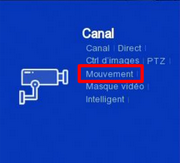
Dans un premier temps, il faut activer la détection de mouvement sur les canaux que vous souhaitez en allant dans le menu Canal/ mouvement
puis en cochant la case basculer (voir ci-dessous)
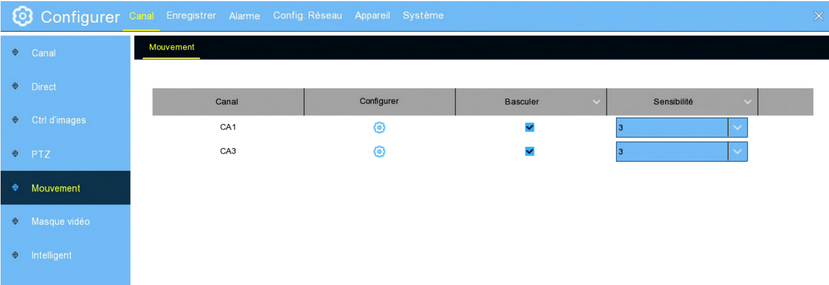
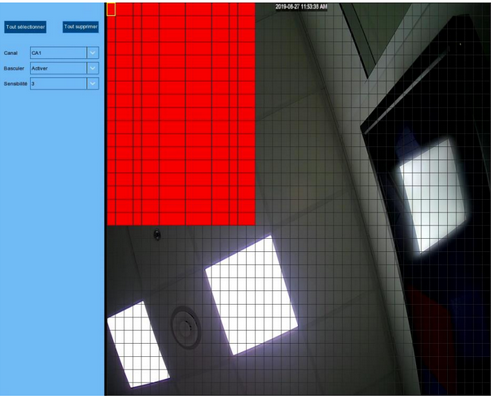
Nous allons maintenant choisir la zone à détecter, pour cela il faut aller dans configurer et ensuite sélectionner en maintenant un clic gauche. La détection de mouvement se déroulera dons dans la zone choisie (zone en rouge)
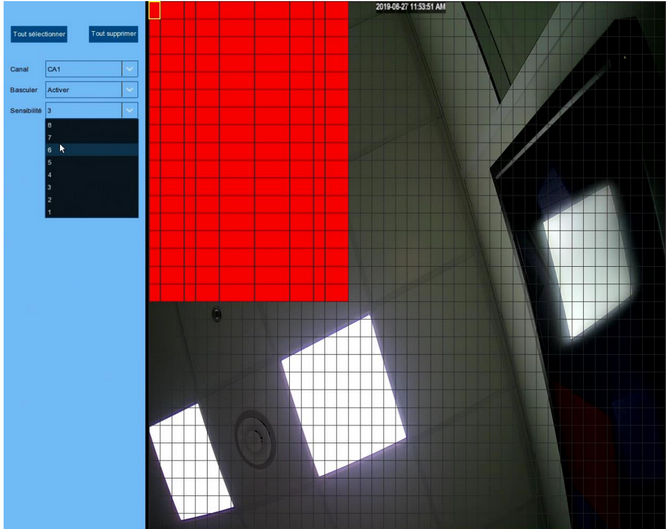
une fois la zone mis en place vous pouvez donc maintenant régler la sensibilité de la détection de mouvement afin qu'elle soit la plus adaptée (allant de 8 à 1, 1 étant la plus basse et 8 la plus élevée
Cet article a-t-il été utile ?
C'est super !
Merci pour votre commentaire
Désolé ! Nous n'avons pas pu vous être utile
Merci pour votre commentaire
Commentaires envoyés
Nous apprécions vos efforts et nous allons corriger l'article