Valid for those references :
- GGM KITIP24C5MP
- GGM KITIP48C5MP
- GGM NVRL0104
- GGM NVRL0104P
- GGM NVRL0108P
- GGM NVR0208P
- GGM NVR0216P
- GGM NVR02168P
- GGM NVR8
- GGM NVR16
- GGM NVR32
- GGM NVRE0104P
- GGM NVRE0108P
Caution : this method is not recomended for outoor cameras
For any configuration, you need to connect an monitor (hdmi or vga) directly on the back of your recorder.
First, Enable motion dection for each camera.
setup/ Channel / motion than enable
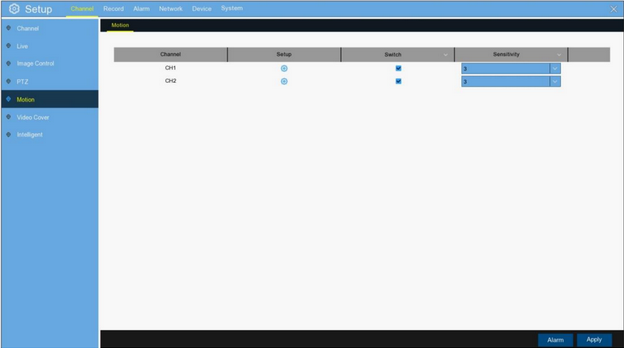
you have the possibility to adjust and accurate the motion detectoin by using 2 parameters : Sensitivity and areas (according your environment and distance between camera and your trigger)
sensitivity: support 1 to 8 levels (8 is the highest level)
Area : set the trigger zone (alarm / motion)
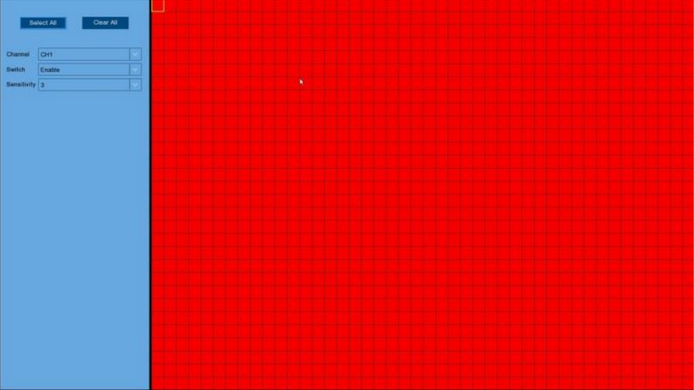
Enable or disable some areas of your camera by choosing trigger zone
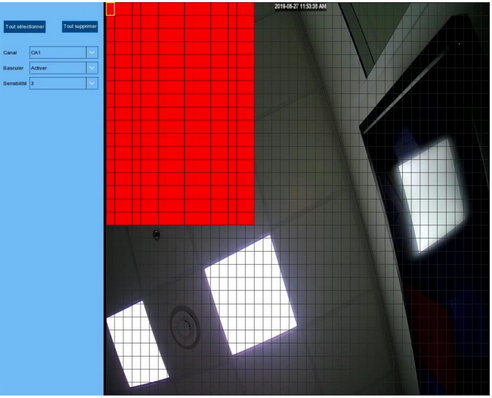
Red areas are active areas (Motion detection enable)
left click to SAVE
Var artikeln till hjälp?
Toppen!
Tack för din feedback
Vi beklagar att det inte var till hjälp
Tack för din feedback
Feddback skickat
Vi uppskattar din feedback och uppdaterar artikeln vid behov