Valid for those references :
- GGM KITIP24C5MP
- GGM KITIP48C5MP
- GGM NVRL0104
- GGM NVRL0104P
- GGM NVRL0108P
- GGM NVR0208P
- GGM NVR0216P
- GGM NVR02168P
- GGM NVR8
- GGM NVR16
- GGM NVR32
- GGM NVRE0104P
- GGM NVRE0108P
Please note that this method only works with recorders below 2021 update and without a reset button on the back.
Caution : For any configuration, you must connect a monitor (HDMI or VGA) directy into your recorder.
You need to have the MAC Address and the date displayed from your recorder.
Where to find your MAC Address ?
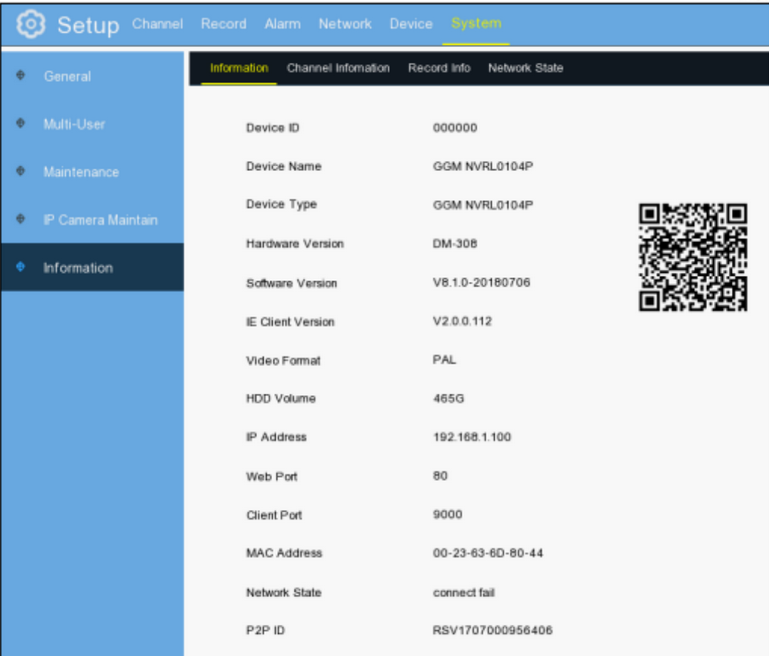
At the Bottom of the screen, in the Menu Bar, go to [i] for information

Then you will see your MAC Address, AS below:
Where to find the Date displayed from your recorder ?
Date is displayed at the right bottom of the main screen
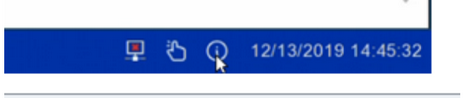
Last, please send us those information ( MAC Address and Date) by email or by phone and we will proceed to the Password recovery.
Var artikeln till hjälp?
Toppen!
Tack för din feedback
Vi beklagar att det inte var till hjälp
Tack för din feedback
Feddback skickat
Vi uppskattar din feedback och uppdaterar artikeln vid behov