Valable pour les références suivantes :
- GGM KITIP24C5MP
- GGM KITIP48C5MP
- GGM NVRL0104
- GGM NVRL0104P
- GGM NVRL0108P
- GGM NVR0208P
- GGM NVR0216P
- GGM NVR02168P
- GGM NVR8
- GGM NVR16
- GGM NVR32
- GGM NVRE0104P
- GGM NVRE0108P
- GGM KITIP816CDM5MP
- GGM KITIP48CDM5MP
À noter que cette méthode ne marche plus sur les versions ayant un bouton reset à l'arrière et en mise à jour 2021 et plus.
Attention : Pour toute configuration, vous devez branchez un moniteur (HDMI ou VGA) directement à l'arrière de votre enregistreur
Merci de lire cette procédure avant de contacter notre Hotline Technique
Afin de récupérer le mot de passe perdu de votre enregistreur, vous devez vous munir de l'adresse MAC de votre enregistreur, ansi que la date de celui ci.
Où trouver l'adresse MAC ?
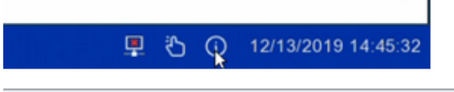
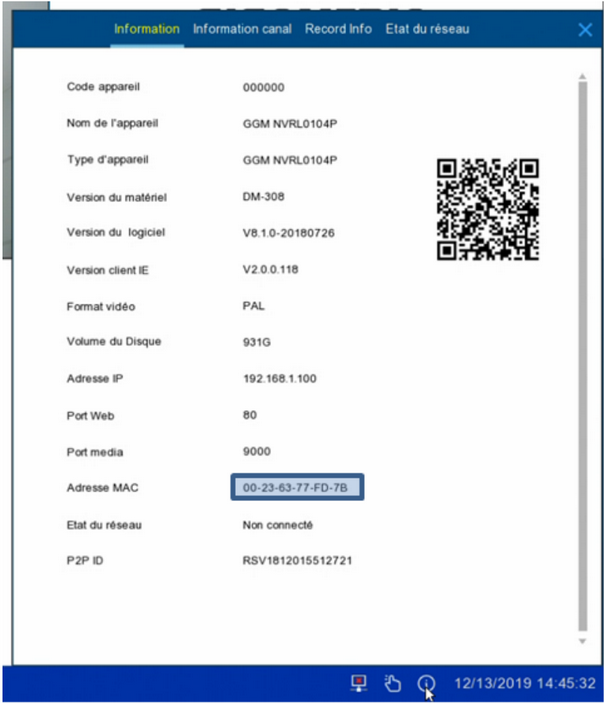
Afin de trouver l'adresse MAC, il suffit de faire un clic droit sur l'écran des caméras, une barre de menu apparait en bas de l'écran. A droite de cette barre il y a un bouton information. il suffit de cliquer dessus et de relever l'adresse MAC.
Où trouver la date de l'enregistreur ?
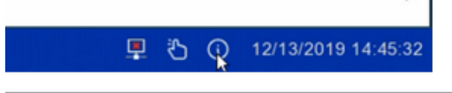
La date de l’enregistreur est indiquée en bas à droite de l'écran de la vue en direct.
une fois que vous avez ces deux informations, contactez le service technique de Gigamedia afin qu'un technicien réinitialise votre mot de passe.
Cet article a-t-il été utile ?
C'est super !
Merci pour votre commentaire
Désolé ! Nous n'avons pas pu vous être utile
Merci pour votre commentaire
Commentaires envoyés
Nous apprécions vos efforts et nous allons corriger l'article