Applies to the following models:
- GGM PAMD120S3
- GGM PAM1120E5D
- GGM PAM1240E5
- GGM PAM6240S3
The PPMS (Specific Safety Plan) priority on a GIGAMEDIA mixer amplifier is managed via the EMC Input (Emergency Message Control), which is designed for alert messages and automatically overrides all other sources. It is the only input designed to force the broadcast of a priority message and shut down zones if necessary.
EMC Input = Absolute Priority
How PPMS Priority Works:
- As soon as a signal is injected, all zones are automatically deactivated and the PPMS message is broadcast with priority.
- This input bypasses volume controls, zone selectors, and other sources.
- It is designed for emergency alert systems such as fire, lockdown, and intrusion alarms.
The module's audio alert output must be connected to the amplifier's EMC input.
The emergency alert module will then automatically broadcast the pre-recorded message upon activation.
Example of an EMC input:
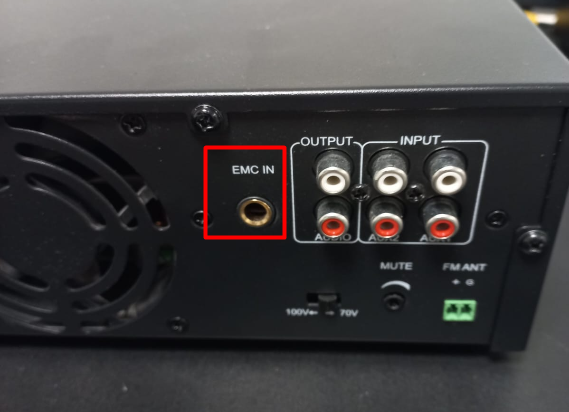
Note: We recommend performing a test activation of the emergency alert system beforehand to adjust the EMC input level so that the message is audible and clear. (Input button and/or MASTER button depending on the model)
Was this article helpful?
That’s Great!
Thank you for your feedback
Sorry! We couldn't be helpful
Thank you for your feedback
Feedback sent
We appreciate your effort and will try to fix the article