Exploring AI Functions on Gigamedia Cameras
Valid for the current range of GIGAMEDIA IP recorders *
Presentation of AI functions: Before using these functions, it is recommended to search the legal side of these functions in your area. Some features store personal data, so it's important to follow regulations. To do this, we invite you to contact your legal department or a competent person
Smart Functions - Concepts
Intelligent functions, often called AI, are functions based on detection following algorithms.
Warning: these functions are to be used in the context of the detection and monitoring of people or sites, in no case do these functions serve as an anti-intrusion alarm and a precaution as to the accuracy of the AI functions, as well as the regulations in force.
Here are the main options common to detections and essentials.
- Dynamic Marking: Enables green target marking during live.
- Min pixel: minimum size of the target in the image - characterized by a green frame.
- Max pixel: maximum size of the target in the image - characterized by a green frame.
- Detection mode: motion or hybrid detection.
- Detection Range: Detection area – yellow or red frame during setup.
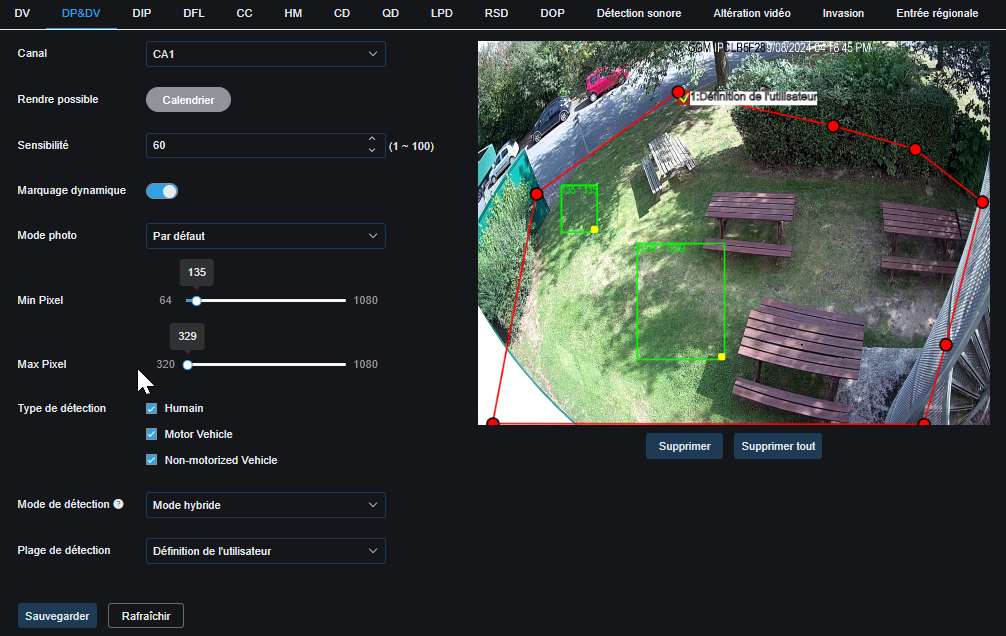
The detection range is the area set for detection, by default full screen, if not per user, here in red when customizing, otherwise in yellow, and on the live in blue on the mainstream only.
- Sensitivity: Some functions use a sensitivity of 0 to 4, 0 to 9, or 0 to 100, with 0 always being the minimum.
- Only one function can be activated, the only possible function in addition to another is the HM density map.
For example, human detection can detect a cat as a human if the settings are not set correctly.
If you have any doubts or need support, you can contact a Gigamedia technician at 0899250013 or support.gigamedia.net
DV – FD – Face Detection
Please note before using this function, you must contact the your legal office for more information.
- Face detection is a process used to identify and recognize a person by analyzing their facial features. This technology is based on sophisticated algorithms that can detect and track facial features such as eyes, nose, mouth, and facial contours. By combining this information, it is possible to reliably identify a specific person from an image or video.
- When setting up a face detection system, it is important to take certain precautions to ensure privacy and respect for the rights of individuals. Here are some precautions to take:
- Consent: Make sure you get consent from people before collecting, storing, or using their facial data.
- Data Security: Have robust security measures in place to protect the collected facial data from unauthorized access or misuse.
- Transparency: Clearly inform individuals about how their facial data will be used and stored.
- Retention period: Limit the retention period of facial data to what is strictly necessary for the purpose of face detection.
- Restricted Access: Restrict access to facial data to only those who are authorized and trained in handling it
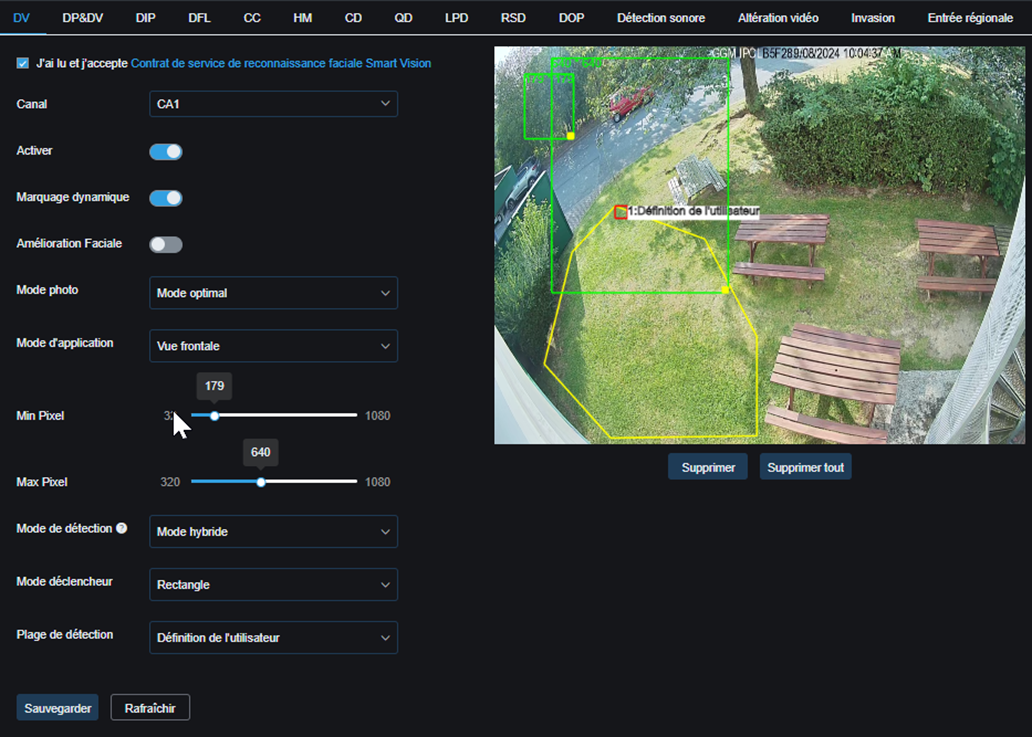
- After consulting a body such as the CNIL, you can set up a face detection system that respects privacy and complies with the regulations in force.
DP&DV – Human and Vehicle Detection
Human and vehicle detection is used in video surveillance systems to identify and track the movements of people and vehicles in a given environment. This feature is essential for security and surveillance in various contexts, such as parking lots, industrial areas, shopping malls, airports, etc.
Here's an example of how to use human and vehicle detection:
Let's imagine a shopping mall parking lot equipped with an advanced video surveillance system. Through the detection of humans and vehicles, the system can automatically identify people and cars entering and exiting the parking lot. This allows the system to generate alerts in case of suspicious activity, count the number of vehicles present, monitor pedestrian movements, and even optimize parking management by indicating available spaces.
- Make sure you have a good viewing angle and check the DORI features.
- Set the parameters in situation, minimum and maximum size of the target objects.
 Define the detection area.
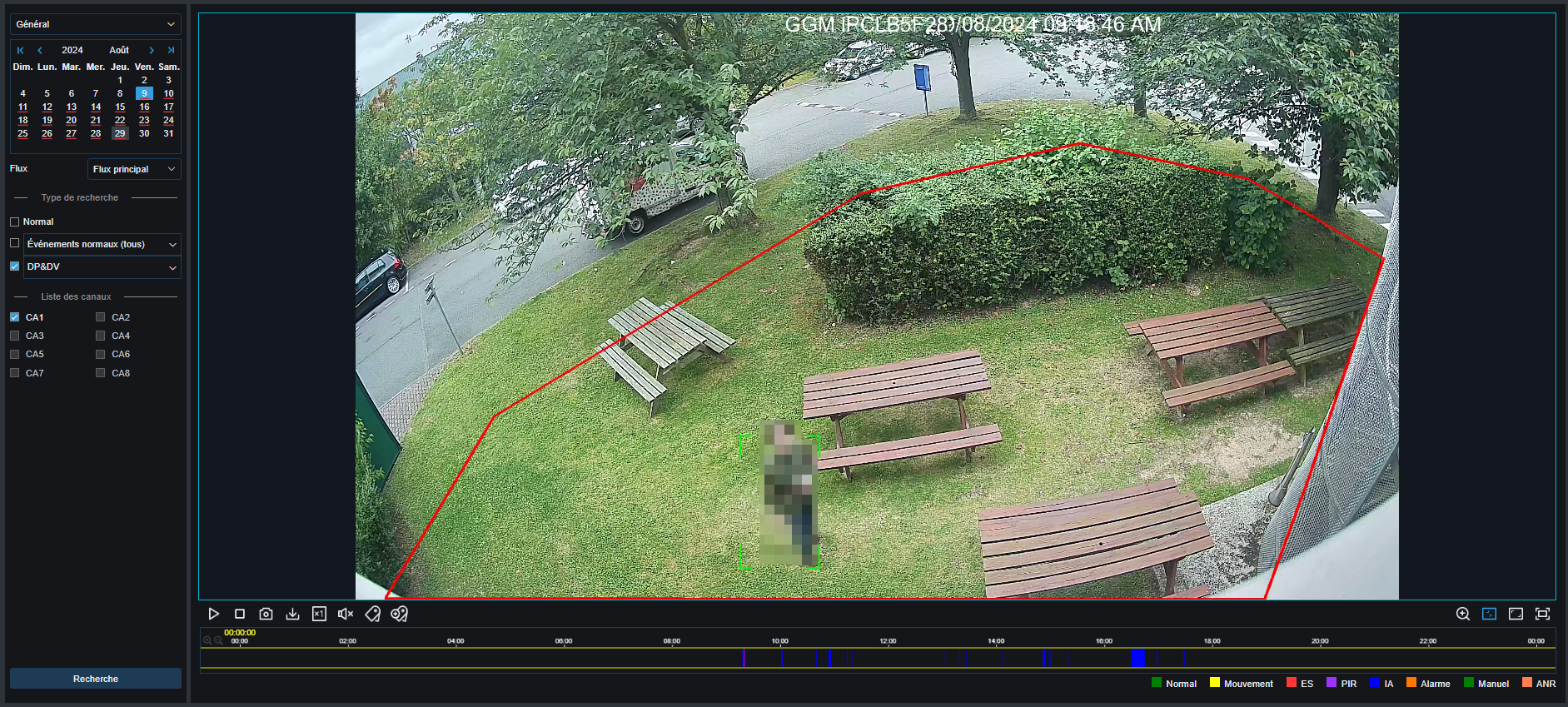
Above is an example of a replay, in the timeline, in blue the detections of humans (Blur added later)
In summary, the detection of humans and vehicles in video surveillance systems improves security, optimizes operations, and facilitates the management of public and private spaces.
You must take the time to configure Min Pixel and Max Pixel in order to have the maximum precision.
PID – Perimeter Intrusion Detection
Perimeter intrusion detection makes it possible to detect humans or vehicles entering the area but also the movement that could enter it, animals, bicycles, unidentified objects.
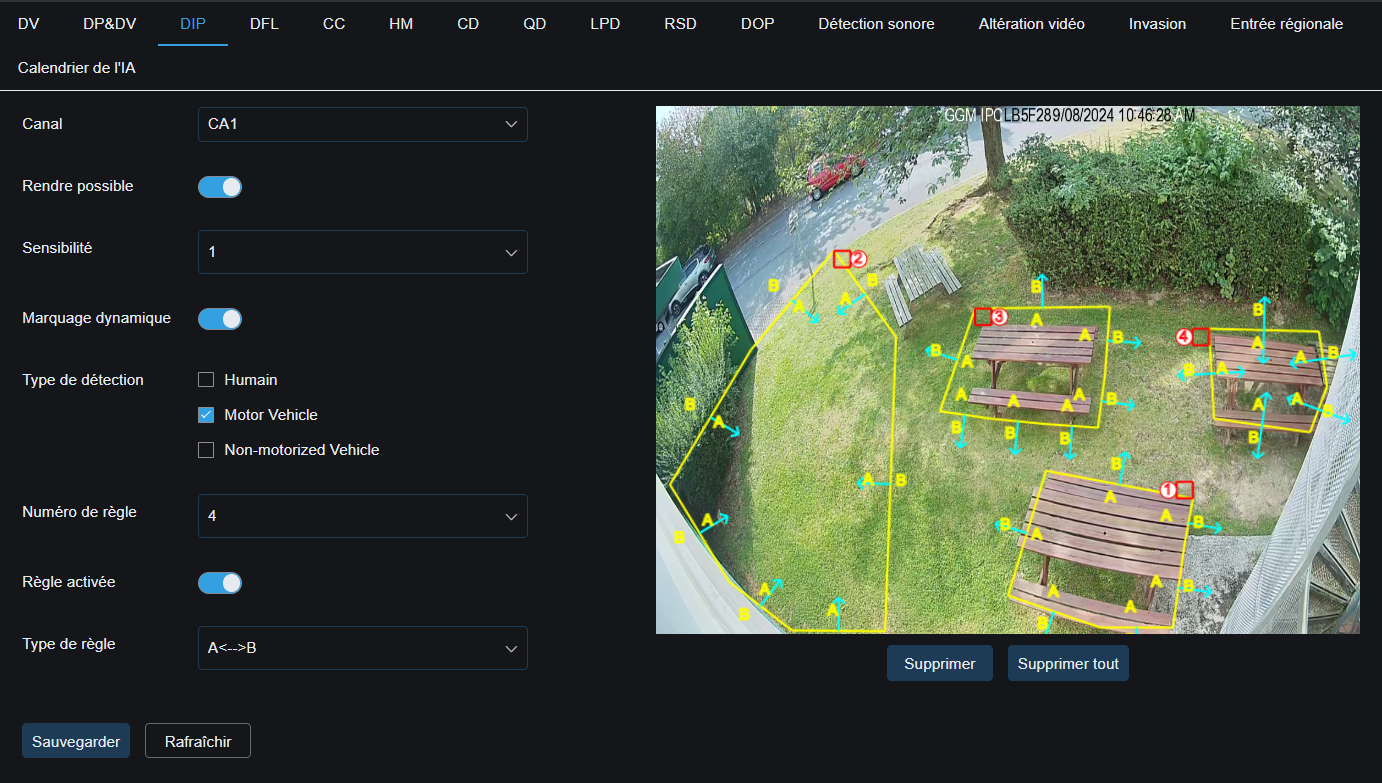
Precautions: this detection mode is less accurate and more sensitive to movement, more false alarms.
Practical details: this mode allows you to detect the opening of a door, for example, when it enters the perimeter, an alert will be recorded.
In this mode it is possible to add 4 zones, in 3 directions of intrusion each,
A > B: exit from the perimeter (zone 3)
B > A: Perimeter intrusion (Zone 2)
A >< B: Entry and exit (Zone 4)
In summary, this mode allows you to monitor multiple perimeters in an area of the camera.
DFL – LCD – Line Crossing
Line Crossing Detection detects when objects or people cross a predefined virtual line in a monitored area, triggering an alert
Used to enhance security and surveillance in various environments, such as sensitive areas, security perimeters, highways, railways, etc.
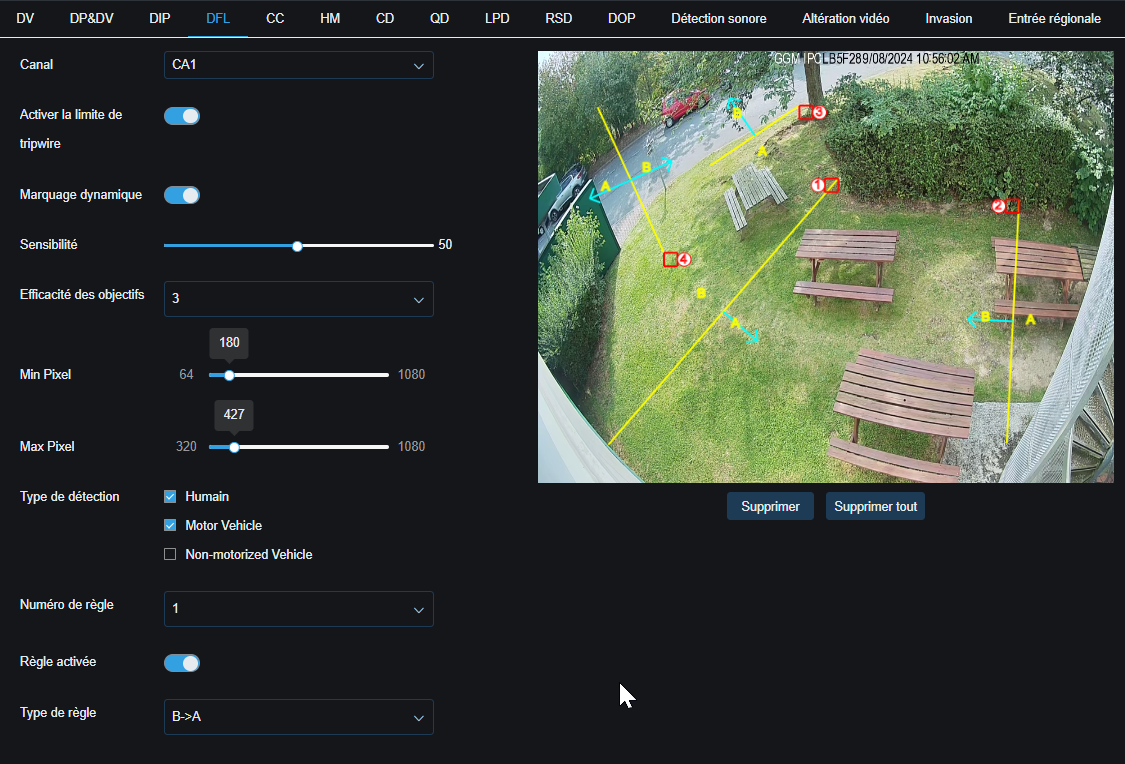 Practical details: This mode allows you to monitor the direction of crossing, for example on a security gate to trigger an alert in the event of a vehicle or pedestrian crossing in the wrong direction.
In this mode it is possible to add 4 zones, in 3 directions of intrusion each,
A > B: exit from the perimeter (zone 3)
B > A: Perimeter intrusion (Zone 2)
A >< B: Entry and exit (Zone 4)
CC – human and vehicle counting
Counting is a feature used in video surveillance systems to count the number of people or objects that pass through a specific area in the opposite direction. Often used in retail environments, shopping malls, museums, public transit stations, etc., to measure the flow of people or objects in specific directions.
By monitoring the movement of individuals or objects in opposite directions, counting can better understand traffic patterns, optimize space layouts, plan resources, and make informed decisions to improve operational efficiency.
Caution: In this mode the camera must be positioned in such a way as to film the ground.
3~m high above the area.
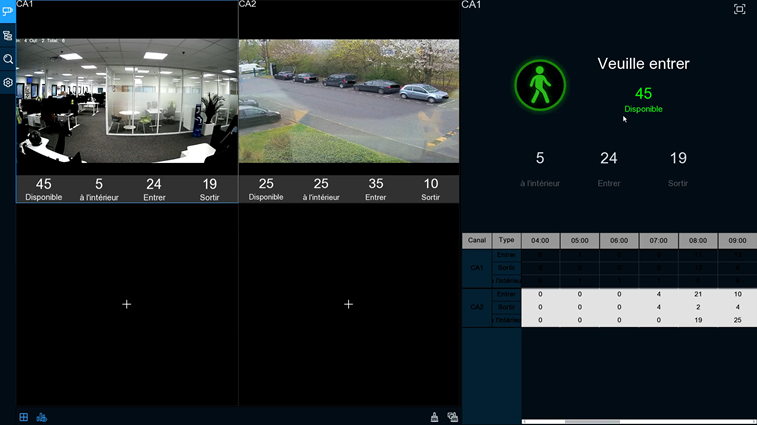
Practical details: this function allows a meter display available only via the HDMI interface of the recorder. AI > configuration > scenes.
Only one possible area, the target must cross the line, to come out on the other side.
3 directions possible, indoor, outer, or in both directions.
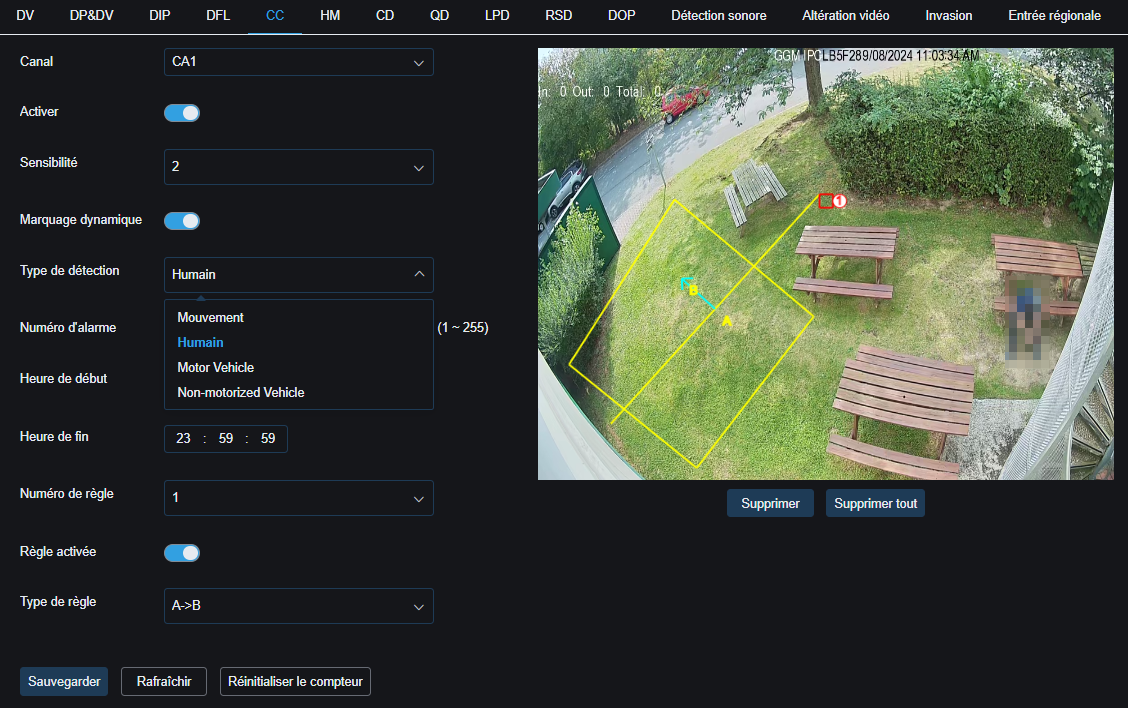
In summary, counting is a valuable tool for analyzing and quantifying the flow of people or objects in opposite directions, thus offering valuable information for the management and optimization of public and commercial spaces.
This type of display is possible
Or this one: 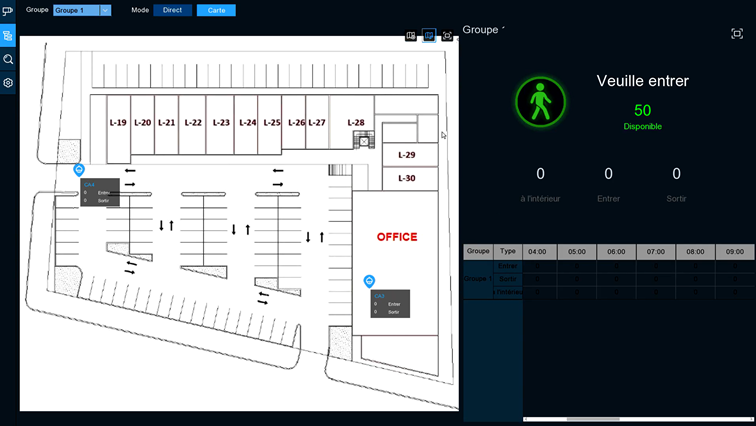
HM – heat map
The "HM" or heatmap function is used in video surveillance systems to graphically visualize areas of high or low activity in a monitored scene, making it easier to analyze traffic patterns and behaviors.
Precaution: installation is strongly discouraged outdoors or in a large area with strong movement.
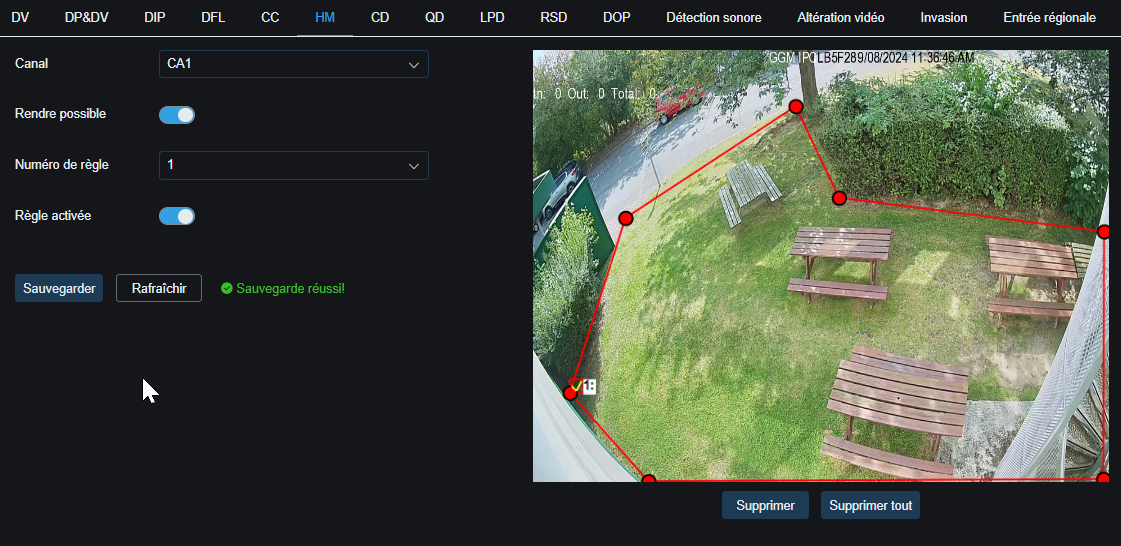
- Simply activate the function, modify the perimeter as needed.
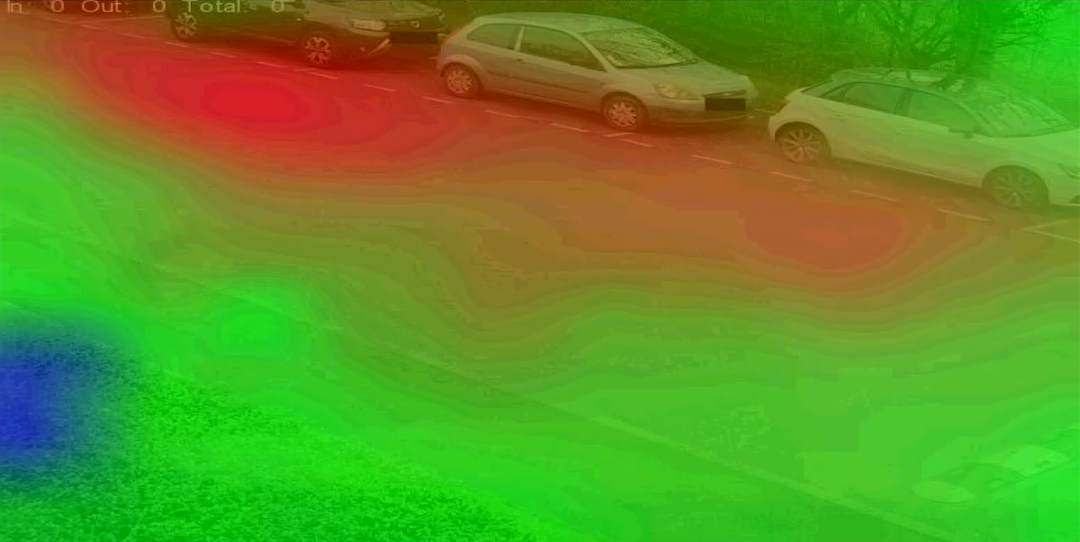
Which gives this type of image:
LPD – license plate detection
License plate detection makes it possible to detect the passage of a vehicle and to identify its license plate. This feature can be used for a variety of purposes, such as opening a gate via dry contact, monitoring the comings and goings of known or unknown vehicles, and identifying vehicles entering a site or lane.
Precaution:
1. LPR recognition function or LPD detection are not the same, take into account that if the camera is not made for this function specifically, you might not be able to use this function properly.
2. Although Gigamedia basic cameras have this feature, they are not intended to act as a specialized LPR camera.
3. Correct adjustment and positioning will result in decreased visibility (angle and brightness) so this camera may not be usable outside of the LPD function enabled.
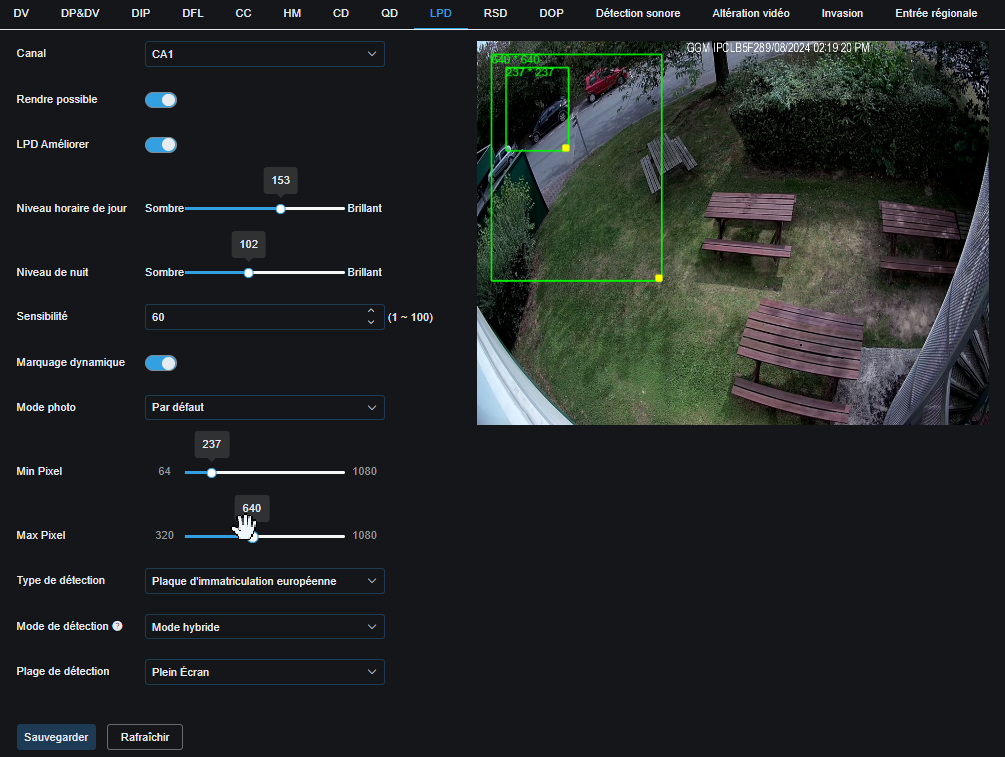
Here's what makes the difference:
- Angle of view To use the license plate detection function, the camera should be fixed towards a restricted area about 2-3m from the target.
- Advanced lighting settings The basic cameras do not have a specialized function to see the plates at night for example or in fog
Via the LPD Upgrade option, you can play with the brightness, but never get close to the possibilities of a dedicated LPR camera.
Following the configuration and after confirmation that the function is working properly, you can go to the AI > recognition menu to configure an allowed list, then to IA > Alarm to trigger a dry contact for a gate opening for example.
Intrusion, Entrance and Area Type:
This is three functions are like DIP, perimeter intrusion detection.
Almost identical, to be used according to your needs.
AI Timeline:
The calendar is to be used if you want to choose different detections during the day.
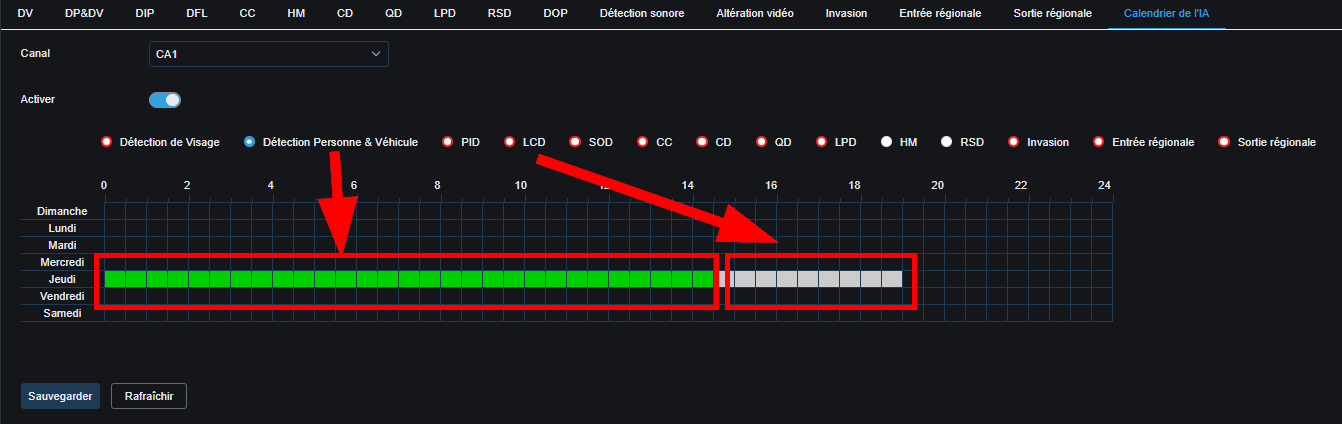 For example, human detection from 8 a.m. to 10 a.m. and perimeter intrusion detection from 10 a.m. to 12 p.m.
Please note that the activation of the calendar takes priority over the activation of the functions. The calendar only handles activation and deactivation, it does not interact with the recording schedule.
----------------------------------------------------
* Depending on the model and firmware version used :
GGM KITIP24C5MP
GGM KITIP24CD5MP
GGM KITIP48C5MP
GGM KITIP48CD5MP
GGM KITIP48C4MPA
GGM KITIP48CD4MPA
GGM KITIP48CDM5MP
GGM KITIP816C5MP
GGM KITIP816CDM5MP
GGM NVRL0104
GGM NVRL0104P
GGM NVRL0108P
GGM NVR0108PA
GGM NVR0208P
GGM NVR020808P
GGM NVR0216P
GGM NVR021608P
GGM NVR021616P
GGM NVR0232
GGM NVR023216P
GGM NVR0416
GGM NVR0432
GGM NVR043216P
GGM NVR0816
GGM NVR081616P
GGM NVR083216P
GGM NVR0832
GGM NVR16
GGM NVR32
GGM NVRE0104P
GGM NVRE0108P
Was this article helpful?
That’s Great!
Thank you for your feedback
Sorry! We couldn't be helpful
Thank you for your feedback
Feedback sent
We appreciate your effort and will try to fix the article