Valid for those references :
- GGM GS20016G2S
- GGM GS20024G2S
- GGM GS20024P2S
- GGM GS20048G4S
- GGM GS20048P4S
- GGM GS2008G2S
- GGM GS2008P2S
To reset the switch, you have two methods:
- Reset via the "Reset" button
You will find a "Reset" button on the front of the device. Simply press and hold it until all the LEDs are on to initiate the reset.
- Reset via web interface
To do this, go to the "Maintenance" tab, then to "Factory Reset", and click on "Yes".
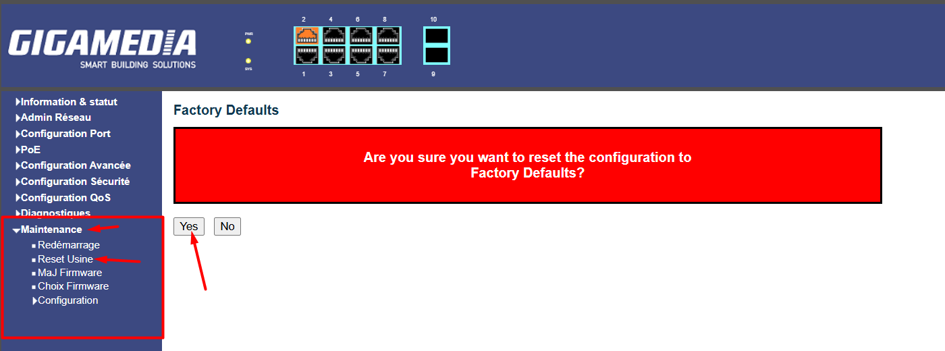
The device will then restart and resume its default configuration.
Was this article helpful?
That’s Great!
Thank you for your feedback
Sorry! We couldn't be helpful
Thank you for your feedback
Feedback sent
We appreciate your effort and will try to fix the article