Valid for the following ranges :
- Essential GGM IPI and GGM NVI series
- Gamme Standard GGM IPS et GGM NVS
- Gamme Advanced GGM IPA et GGM NVA
- GGM IPP and GGM NVP Pro Series

This article applies only to certain references *
With GGM WATCH, you can share your NVR or cameras with another account GGM WATCH.
The other person must have their own account GGM WATCH.
The sharing function allows you to allow viewing, replaying recordings, PTZ control or even certain configuration rights depending on the permissions granted.
How to create a GGM WATCH account:
- Install the GGM WATCH app on the smartphone (Android or iPhone).
- Open the app.
- On the login screen, choose Register. Registration can be done with an email address or phone number.
- Enter an email address or number.
- Enter a password
- Validate the privacy statement and then click on Register now
- Specify the verification code (Captcha type) then click on send the 2nd code
- Retrieve the sent verification code.
- Validate the creation of the account.
How to share to another GGM WATCH account:
- Open the GGM WATCH app.
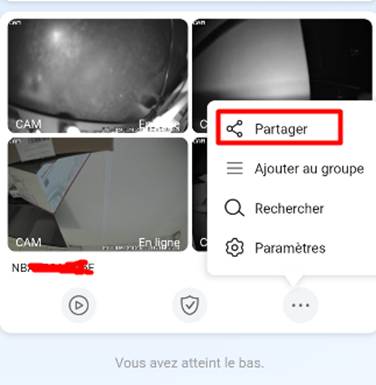
- From the list of devices, select the device to share and tap on the 3 dots (...) next to the NVR or camera
- Select Share. Ability to select one or more cameras.
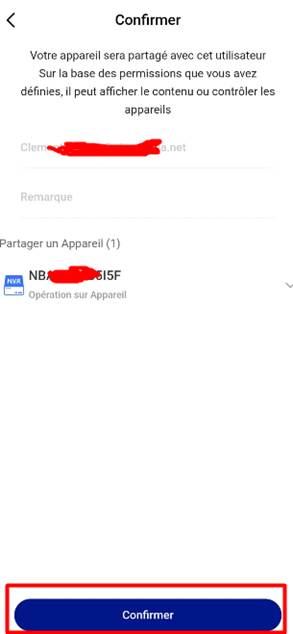
- Enter the email address or phone number associated with the recipient's GGM WATCH account
- Choose which rights to grant
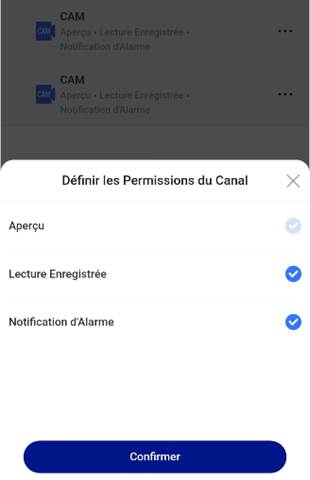
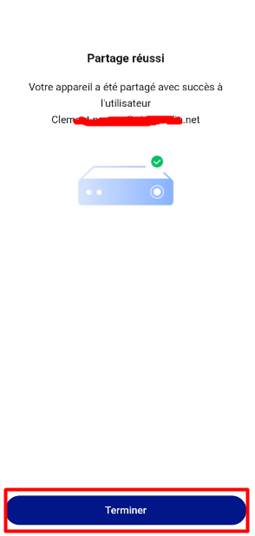
- Validate the share. The recipient will receive a notification and will then see the device appear in their application.
At any time, you can check, modify or delete an account in your Shares:
Me menu then Manage shares

* Valid for the references below :
- GGM NVA321604MR
- GGM NVA320002MR
- GGM NVA320004MR
- GGM NVA160002R
- GGM NVA161602R
- GGM NVP2560016MR
- GGM NVP1280016MR
- GGM NVP640016MR
- GGM NVS160001D
- GGM NVS080801D
- GGM NVS040401D
- GGM NVI080801D
- GGM NVI040401D
- GGM IPAD4F2IR
- GGM IPAD6F2IR
- GGM IPAD8F2IR
- GGM IPAD4VM2IR
- GGM IPAD6VM2IR
- GGM IPAD8VM2IR
- GGM IPAT4F2IR
- GGM IPAT6F2IR
- GGM IPAT8F2IR
- GGM IPAT4VM2IR
- GGM IPAT6VM2IR
- GGM IPAT8VM2IR
- GGM IPAB4F2IR
- GGM IPAB4VM2IR
- GGM IPAB6F2IR
- GGM IPAB8F2IR
- GGM IPAB4VM5IR
- GGM IPAB6VM2IR
- GGM IPAB8VM2IR
- GGM IPAS5432IR300
- GGM IPPTT5AAA
- GGM IPPTT5ABB
- GGM IPPF121IR
- GGM IPPA4F2IR
- GGM IPPBP8F2DL
- GGM IPPTP8F2DL
- GGM IPPBT5AAA
- GGMIPPBT5ABB
- GGM IPPBL4VM2IR
- GGM IPPBL4VM8IR
- GGM IPPBT4BBC
- GGM IPPBT4BDD
- GGM IPPBT4BDE
- GGM IPSD4F2DL
- GGM IPSD6F2DL
- GGM IPSD8F2DL
- GGM IPSD4VM2IR
- GGM IPSD8VM2IR
- GGM IPST4F2DL
- GGM IPST6F2DL
- GGM IPST8F2DL
- GGM IPST4VM2DL
- GGM IPST6VM2DL
- GGM IPST8VM2DL
- GGM IPSC6F2IR
- GGM IPSB4F2DL
- GGM IPSB6F2DL
- GGM IPSB8F2DL
- GGM IPSB4VM2DL
- GGM IPSB6VM2DL
- GGM IPSB8VM2DL
- GGM IPIT8F2DL
- GGM IPIB8F2DL
Warning : Some camera models do not have P2P, so it is impossible to connect remotely with the QRCode (prefer another method).
Here is the list of cameras without P2P (no NAT menu):
PTZ:
- GGM IPSS4425IR160
- GGM IPSS4225IR300
- GGM IPSS344DL50
- GGM IPSP143IR30
- GGM IPAS5440IR350
- GGM IPPS7837IR300
- GGM IPIT2F2DL
- GGM IPIT4F2DL
- GGM IPIT4VM2DL
- GGM IPIB2F2DL
- GGM IPIB4F2DL
- GGM IPIB4VM2DL
Was this article helpful?
That’s Great!
Thank you for your feedback
Sorry! We couldn't be helpful
Thank you for your feedback
Feedback sent
We appreciate your effort and will try to fix the article